Second attempt to configure the OPNsense router networking as "host-only"
Configuring OPNsense networking as “host-only”
Let’s recap
We want to implement the following topology:

Why?
Given the computational capabilities that are required to run several virtual machines, to construct our mini-network, we have to split our virtual network in several hosts. The proposed distribution needs routers/firewalls to behave as a typical enterprise network. Routers will enable the capability to create dedicated tunnels between hosts. And, in this way, we will be able to communicate the internal networks, which behave as different network segments of the enterprise network.
How to proceed?
Then, currently, the issue is in getting to communicate the 02 of the virtual routers, from different physical servers, between each other with out any problem.
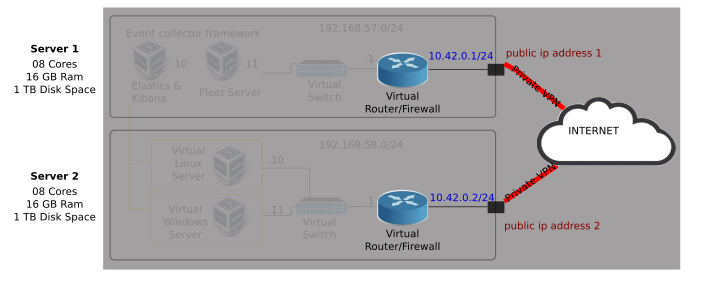
If we managed to communicate the OPNsense routers from both of the physical servers with a private VPN, then, we can connect the internal networks behind both routers.
Then, what is the current issue?
Well, we managed to get the virtual router of one of the servers to be able to communicate with the exterior by configuring the virtual machine network as “Bridge” and “NAT” modes. However, when we attempted to do so with “Host-only” or “Internal-Network”, the router just simply can not communicate with the outside world.
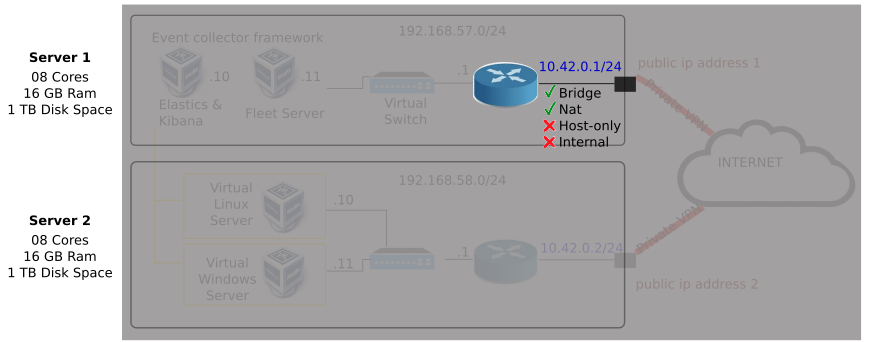
OPNsense router in Bridge “Mode”
LAN (em1) -> 192.168.56.2/24 -> 6d:d4 -> eno2 WAN (em0) -> 10.30.12.29/24 -> d2:c9 -> eno1