We attempted to configure the OPNsense router but connectivity problems happened ...
So, to remember why we are doing all this let’s take a look at two pictures.
First picture depicts the network we are attempting to build
Here is our implementation target
This network is for our event generation ai-analysis
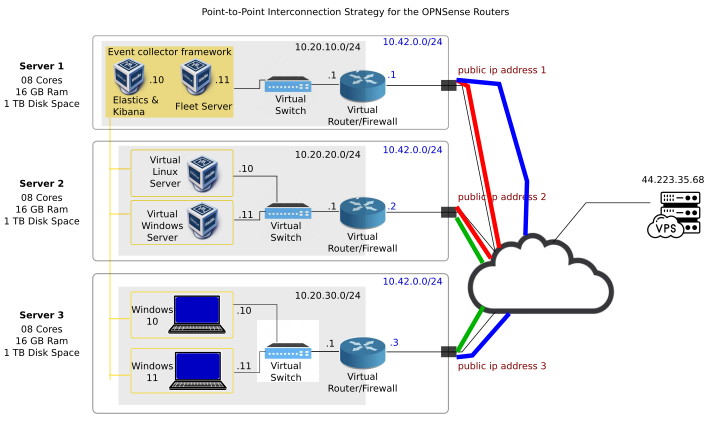
So, to implement this network, we start with the virtual router
We’ll use OPNsense router OS software to implement this virtual router
This virtual router will have two network interfaces
The LAN interface will face an internal network configuration. We have already decided which network IP range we’ll use
Now, the other interface is the WAN interface
This WAN interface somehow has to interconnect with the virtualbox host network configurations
And here is the problem to solve today
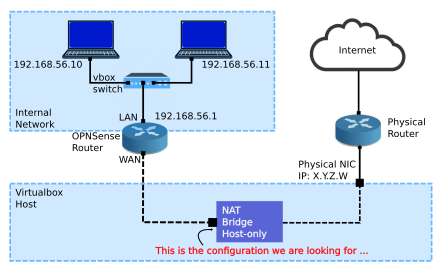
Remember that per our assumptions, our physical host (which -in this precise moment- is the same as saying the virtualbox host) gets assigned a public IP address x.y.z.w on its eno1 interface. So, it is highly likely that, on a bridge connection, the physical router won’t assign an IP address to the OPNsense router. It’s obvious it won’t happen. Just imagine if I could connect n vms in a bridge mode, all of them will be using a different IP address from the available pool that the physical router gets allowed to assign
Well, maybe NAT, or maybe host-only connection …
Well, those options need to be inspected, including brdige mode just to be 100% sure, right? … RIGHT?