Current status
Current status
Current network
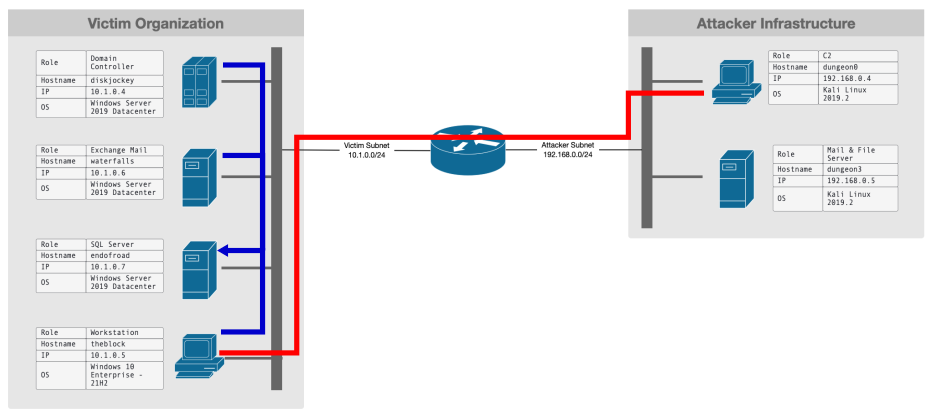
Target infrastructure
- Windows 10 workstation (Target)
- Windows Exchange Server
- SQL Data Base Server
- Domain Controller
- Elasticsearch
Attacker infrastructure
- Kali Linux (Attacker)
- Email/FTP Server
Event classes and Elasticsearch indices
We are interested in the following event classes:
- Network events
- Audit events
- Performance/Metric events
- System events
Elasticsearch indices for Network events
- ds_logs-network_traffic.dns*
- ds_logs-network_traffic.icmp*
- ds_logs-network_traffic.http*
- ds_logs-network_traffic.tls*
- ds_logs-network_traffic.flow*
Elasticsearch indices for Performance/Metric events
- ds_metrics-system.cpu*
- ds_metrics-system.filesystem*
- ds_metrics-system.process*
- ds_metrics-system.socket*
- ds_metrics-system.memory*
- ds_metrics-system.network*
- ds_metrics-system.load*
- ds_metrics-system.fsstat*
- ds_metrics-system.diskio*
- ds_metrics-system.process.summary*
Elasticsearch indices for Audit events
- ds_logs-windows.audit*
- ds_logs-windows.sysmon_operational*
Elasticsearch indices for System events
- ds_logs-windows.sysmon_operational*
How do we label the data?
Pull of data-streams from elasticsearch

How do we identify malicious events

Example: System Events
Procmon
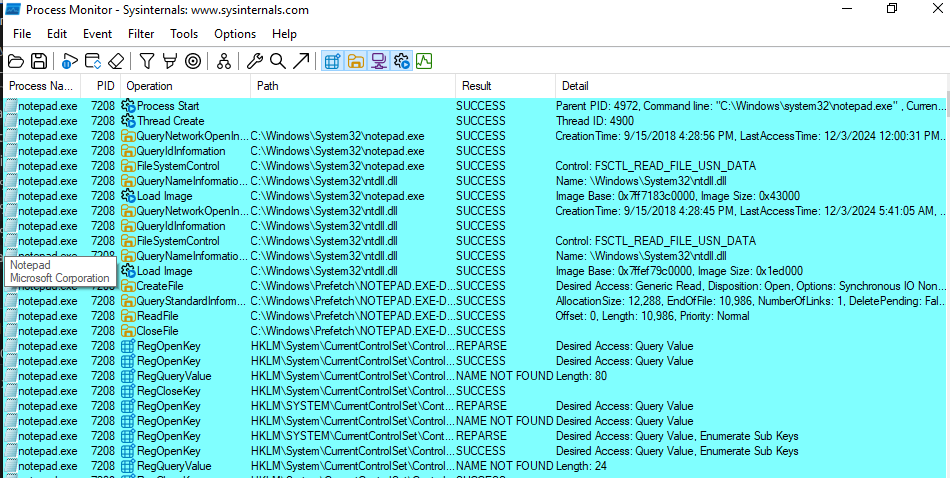
- Windows10-based vm with
procmon. - We execute
notepadapplication and collect all the caused events.
Procmon columns
Application Details:
- Process Name: name of
executableassociated with theprocessperforming theoperation. - Image Path: The full
file system pathto theexecutableassociated with the process. - Command Line: The full command line used to start the
process, including parameters.
Event Details:
- Sequence Number: unique, incrementing number assigned to each
eventas it is logged. - Event Class: The type of system event being recorded: (
File System,Registry,Process,Network). - Operation: the type of
action or eventbeing performed by theprocess(CreateFile,RegQueryValue,Process Start). - Date & Time: the
absolute date and timewhen theeventoccurred. - Category: a more specific
classificationof theoperationwithin theEvent Class(UnderFile System, categories might includeReadorWrite). - Path: The specific file, registry key, or other resource targeted by the operation.
- Detail: additional information.
- Result: The outcome of the
operation(SUCCESS,ACCESS DENIED,NAME NOT FOUND) - Relative Time: the time elapsed (in seconds) since
procmonstarted logging. - Duration: the amount of time (in seconds) taken to complete the
operation. - Completion Time: the exact timestamp when the
operationfinished.
Process Management
- User Name: the
usernameof the account under which the process is running. - Session ID: the
windows session IDassociated with theprocess. - Process ID: a unique identifier assigned to the
processby theoperating system. - Thread ID: the unique identifier of the
threadwithin theprocessthat performed theoperation. - Parent PID: The PID of the
processthat spawned the currentprocess.
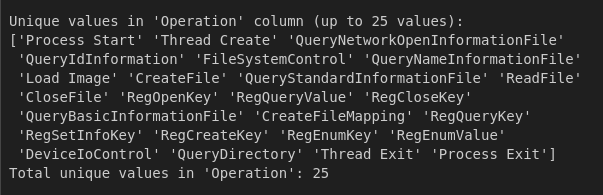
Procmon Operation type (unique values)
Sysmon Event names
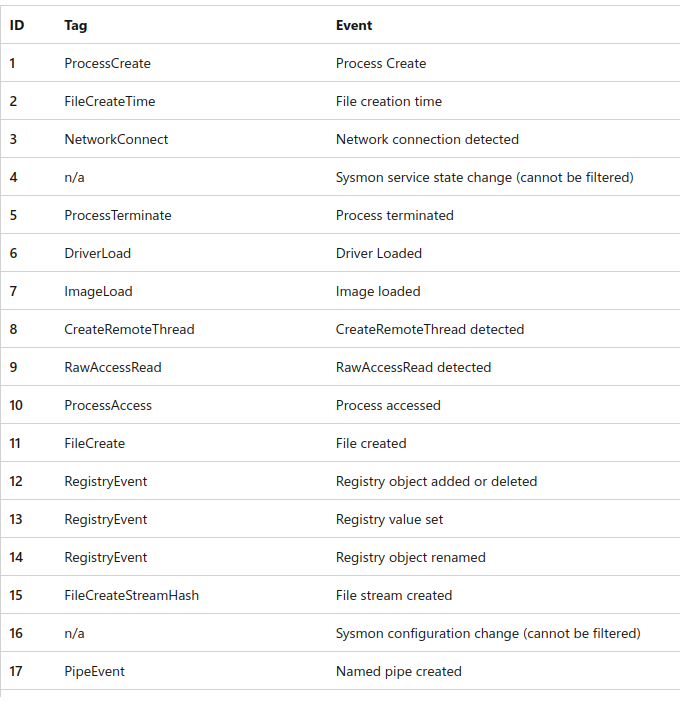
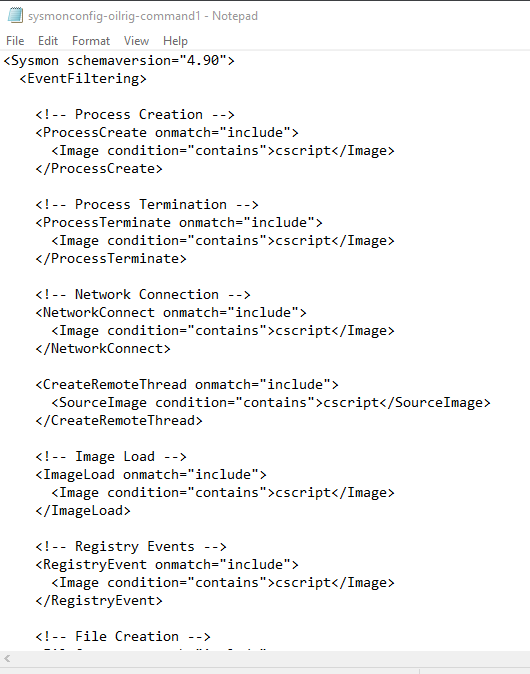
Filter in Sysmon
This post is licensed under CC BY 4.0 by the author.